Managing one supermarket is a hectic job. Let alone managing 5 supermarkets, it seems like handling big business unless the back end operations are all interconnected. Stock replenishes more quickly, prices can no longer be managed, store managers require accurate stock data without multiple calls and spreadsheets. A Supermarket POS system provides a developing supermarket chain with one system in their operation: checkout process, in inventory management, in sales, staff access, and reporting. It enables the owner to visualize what is going on at the branches without having to be everywhere, resulting in more controlled expansion and easier management. This article covers the changes that occur after the first store, and how a centralized POS system helps a larger supermarket chain maintain its connectivity.
Understanding Operational Shift from One to Multiple Supermarket Stores
The second store changes more than just the basic postal address. It impacts the way decisions are made. Branches might sell at different speeds, have different stock levels and different staffing pressure. However, customers still have the same price expectations, promotions, service and product availability. A supermarket Point of Sale solution can help put all of those moving parts in one building. When inventory and employee activity, purchasing and reporting aren’t dependent on different files, isolated terminals, and manual updates from each branch, centralized management becomes a necessity.
Enhancing Efficiency with Supermarket POS Systems
Supermarket POS system will integrate the checkout transaction and the entire store operation, and daily work will be more active and smoother.
Streamlining Checkout Processes
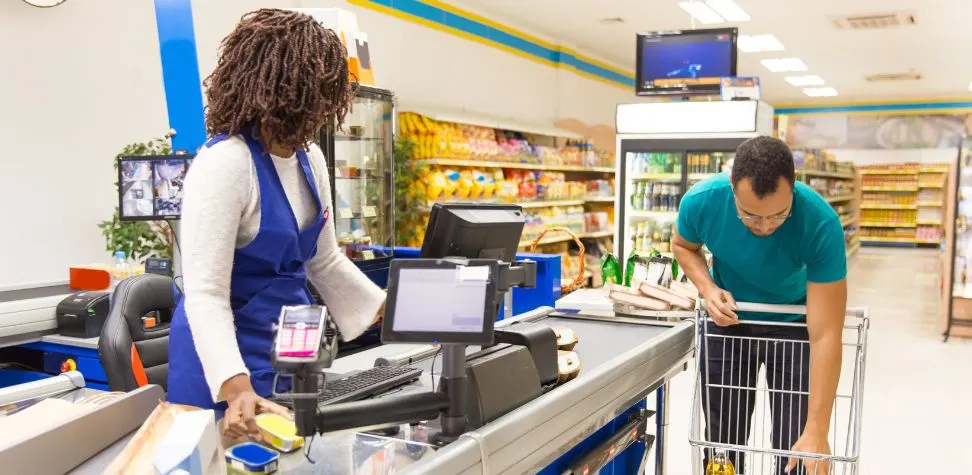
Fast checkout without compromising billing accuracy is essential for high volume checkouts. The barcode scanning, integrated weighing, fast product search, stored price and various methods of payment minimize the manual effort at the counter. Peak hour queues are more manageable for cashiers, and the time spent by supervisors on correcting items, missed discounts or avoidable pricing mistakes during peak hours is also reduced.
Inventory and Sales Tracking
Every sale should immediately tell the business what has moved and what remains. A Supermarket POS system can update stock as transactions happen, giving managers a clearer picture of fast sellers, slow movers, branch demand, and low-stock items. This helps purchasing teams replenish with better timing instead of relying on rough estimates or delayed physical counts.
Customer Experience Enhancements
Customers notice consistency. They expect to find the same deal in other branches and that the same loyalty balance comes along. That’s made possible by centralized customer profiles, digital receipts, loyalty points, fast refunds and synchronized promotions. Faster billing processes are significant on busy days like weekends, festive shopping days, and during the busy hours in the evening when checkout volume escalates.
Key Features of Advanced Supermarket POS Solutions
When a supermarket becomes a chain, the software should be able to control the business between stores, not just within the stores.
- Centralized product and pricing control: Always update the item masters, taxes, promotions, category rules and selling prices in one place, then roll out approved changes to selected branches.
- Real-time branch dashboards: A Supermarket POS setup can present the sales data, stock turnover, cashier activities, returns, discounts, and performance of the store, without having to wait for the end-of-the-day spreadsheets.
- Integrated retail tools: Integrate barcode scanners, weighing scales, loyalty systems, payment stations, purchase processes, accounting or ERP systems, to eliminate duplicate efforts.
Manage Inventory Across Every Supermarket Location
Multi-store inventory needs one reliable view because excess stock in one branch can exist beside an empty shelf in another.
Centralized Inventory Visibility
A central stock view shows what each branch has, what is reserved, and what is selling quickly. With a Supermarket POS system, managers can compare item quantities across stores before placing another supplier order. That makes it easier to identify overstock, locate scarce products, and respond when one branch suddenly sells through a popular line.
Smarter Stock Transfers and Replenishment
A growing supermarket chain does not just refill stock just because one store has run out of stock. Managers can also check nearby branches, approve an internal transfer and log the transfer correctly. It is also possible to use reorder levels and sales history for replenishment. This minimizes emergency buying, eliminates the duplication of buying and makes allocation of warehouse products to stores more controlled.
Batch, Expiry, and Perishable Goods Management
Fresh dairy products, bakery goods, chilled foods, produce, and packaged groceries are perishable and cannot be handled like durable products. For these perishable products, close attention must be given to batch numbers, receiving dates and expiration dates as well as stock rotation. POS integrated inventory information enables teams to detect products expiring early, strategically schedule markdowns, optimize stock rotation, and minimize unnecessary waste before products go out of sale.
Gain Complete Visibility into Sales and Business Performance
With one location, an owner can often sense how the store is performing by walking the floor. That stops working at scale. Central reporting brings branch sales, gross margins, category performance, returns, discounts, tax totals, payment types, and cashier activity into comparable views. Managers are able to identify underperforming stores, products that are selling differently in different areas, and odd transaction trends. They can also compare hourly, daily, weekly, or seasonal results; and transform store information into working conclusions about staffing, promotions, purchase, and expansion.
Deliver a Consistent Customer Experience Across Locations
A growing chain should feel familiar at every store, even if the size of the store, number of people visiting, and local demand are different.
- Ensure that the same loyalty points, customer history, approved discounts, return policies and promotions are used at all participating locations.
- Use consistent product names, pricing, receipt formats, and checkout processes to make it easier for customers to see what they’ll get at different stores.
- Get purchasing history and branch demand trends to make relevant offers without making each location into a full-scale marketing program.
Simplify Staff and Store Operations at Scale
With multiple locations comes more employees, cash drawers, shift changes, approvals, and inconsistency. A Supermarket POS system can have role based access so that cashiers, supervisors, managers and administrators see only the functions that they need. Attendance related activity, cashier sales, voids, discounts, refunds and shift totals can be reviewed more systematically by store leaders. Head office can standardize operating rules while still giving branch managers enough control for daily decisions. That balance makes supervision stronger without slowing every store with unnecessary approvals across the network.
Strengthen Security, Compliance, and Multi-Store Control
Business growth increases the number of people dealing with cash, customer information, pricing, refunds and any sensitive business data. Use of central controls can minimize that exposure. Price overrides, manual discounts, returns, voids and back office settings may be limited based on permission levels. Detailed logs help to track unusual activity. Integrating payment requires security measures and control of user access that further enhance data handling. As the supermarket chain grows, head office can roll out changes in the system, rather than depending on each location maneuvering critical policy settings on their own.
Expand Your Supermarket Chain with Gokul’s Smart POS Management Today
Opening the next branch should not mean creating another isolated operation. Gokul helps growing retailers manage billing, inventory, branch reporting, staff controls, promotions, and store-level activity through a connected Supermarket POS system. Your team gains clearer visibility across locations while each store keeps moving at checkout speed. Whether you are adding a second supermarket or building a wider chain, Gokul POS gives management a cleaner way to standardize processes, control stock, review performance, and scale without losing operational grip with confidence.

Founder & CEO of Gokul System Solutions: Based in Schaumburg, Illinois, he leads a company providing Point of Sale (POS) and payment solutions for retail industries in the USA, Canada, UK, and India.